

Google has officially unveiled Android 17, the next major version of its mobile operating system, during the dedicated Android Show event held ahead of the I/O developer conference. The update is brimming with new features, heavily leveraging artificial intelligence but also introducing meaningful non-AI improvements. From a complete emoji redesign to smarter transcription and broader cross-platform file sharing, Android 17 aims to refine the user experience while keeping security and digital well-being front and center.
All-new emoji
One of the most visually noticeable changes in Android 17 is the overhaul of the entire emoji set — all 4,000 of them. Google has shifted away from the flat, cartoonish style that has defined Android emoji for years, opting instead for a more three-dimensional look with added depth, shading, and detail. This redesign brings Android's emoji in line with modern design trends and aims to make expressions more expressive and realistic. The new emojis will first arrive on Pixel phones later this year, with a broader rollout expected to follow.
Pause Point
Digital well-being continues to be a priority for Google. Pause Point is a new tool that helps users avoid mindless app usage. After labeling certain apps as distracting, every time the user tries to open one, they are greeted by a 10-second timer. During this pause, the system suggests breathing exercises or offers to open a more productive app instead. While the user can still proceed after the timer, the friction is designed to encourage mindful behavior. Notably, disabling Pause Point requires a full phone restart, adding an extra layer of commitment. Users can also set session timers for each app, making it easier to limit time spent on social media or games.
Screen Reactions
Content creation gets a boost with Screen Reactions, a feature that allows users to record both their screen and their front-facing camera simultaneously. This makes it trivial to produce reaction videos, tutorials, or commentary. The user appears as a cutout overlay on top of whatever is on screen — be it a photo, video, or webpage. Google claims the feature works in just a few taps. It will launch first on Pixel phones in summer 2026, and is expected to appeal to the growing community of mobile content creators.
Even more AirDrop
After introducing interoperability between Android's Quick Share and Apple's AirDrop last year on select Pixel and Galaxy devices, Google is now expanding support to more manufacturers. Phones from Xiaomi, Honor, and OnePlus will gain compatibility, joining Oppo and Vivo. For devices that still lack native support, Google is introducing a QR code workaround: iPhone users can scan a QR code generated by Quick Share to receive files directly to their iCloud storage. Additionally, later this year, Quick Share and AirDrop support will be integrated directly into apps like WhatsApp, making cross-platform file transfers even more seamless.
Easier switching from iPhone
Switching from an iPhone to Android has historically been cumbersome, but Apple and Google have been collaborating to smooth the process. Apple added wireless transfer support for files, contacts, messages, home screen layouts, and eSIMs in iOS 26.3. However, the feature required a compatible Android 17 device to receive the data. Google now confirms that support will finally roll out this year, starting with Pixel and Galaxy phones. This should reduce the barriers for iPhone users considering a switch to Android.
Rambler
The AI-powered features under Google's Gemini Intelligence umbrella include Rambler, a smart real-time transcription tool. Rambler goes beyond simple speech-to-text by automatically removing filler words like "um" and "ah", correcting errors, and condensing your message into a more concise form. During a press demo, Google showed how Rambler handled a shopping list dictated with spontaneous changes — when the speaker changed their mind about wanting bananas, the AI intelligently omitted them from the final list. Rambler also supports switching between multiple languages within the same message, making it particularly useful for multilingual users. It will be available on the latest Samsung Galaxy and Google Pixel phones this summer.
Create My Widget
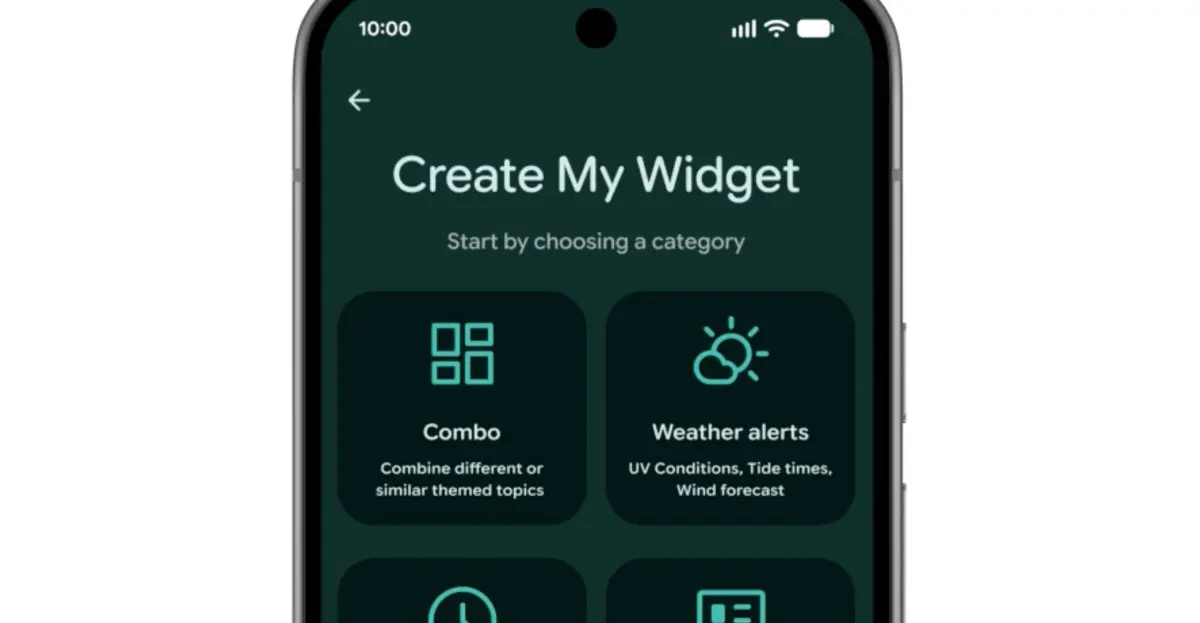
Another Gemini Intelligence feature is Create My Widget, which allows users to build custom home screen widgets using natural language prompts. For example, you could ask for a meal planner that prioritizes high-protein recipes, a weather widget for cyclists that highlights wind speed and rain, or a live feed of upcoming concerts at a local venue. This feature was inspired by Nothing's Essential App widgets and gives users unprecedented flexibility to design their home screen exactly how they want. It will also roll out to select Galaxy and Pixel phones this summer.
Gemini automation
Beyond Rambler and Create My Widget, Android 17 brings a host of other AI automations. Task Automation, which previously handled food delivery and rideshare apps, expands to new categories. Gemini will be able to order groceries from a shopping list in your notes app or plan a travel itinerary based on a photograph. Chrome auto browse comes to Android in late June, enabling voice-activated web browsing, and Gemini will appear in Autofill to help complete forms more quickly. These features aim to make the phone proactive rather than reactive, anticipating user needs.
More security features
Security is also a focus of Android 17. Google is collaborating with banks to block calls that spoof their numbers, though this requires the user to have the banking app installed. Improved malware detection will monitor app behavior for suspicious activities like SMS forwarding or background launching without user consent. Chrome's safe browsing mode will now scan APK downloads for known malware. Additionally, theft protection is enhanced: users can enable biometric protection remotely when marking a phone as lost in Find Hub, and the system reduces the number of allowed PIN/ password attempts while increasing wait times between failures. These measures are designed to protect users from increasingly sophisticated scams and thefts.
Android 17 represents a balanced update that leverages AI to make daily tasks easier while retaining classic improvements to emoji, screen time management, and security. The rollout begins later this year on Pixel devices and will expand to other manufacturers in subsequent months.
Source: The Verge News